How to save and manage inquiries in WordPress
Last updated:
What you'll learn
- See what can go wrong when you receive inquiries only by email.
- Learn how Formii saves incoming inquiries in WordPress.
- Find the screen for checking saved inquiries, and the features for tracking and exporting them.
Problems with receiving inquiries only by email
If your contact form only sends you emails, these things can happen.
- A notification gets buried among other emails, and you miss the inquiry.
- When someone else takes over, the inquiries in the previous person’s mailbox are harder to hand over.
- If an email never arrives because of server settings or a spam filter, the inquiry is not recorded anywhere.
Inquiries are saved in WordPress
Formii saves every inquiry sent through your forms in the WordPress database. This also works in the free version, with no setup.
When a form is submitted, Formii saves the inquiry first and then sends the notification email and the auto-reply. Even if sending an email fails, the saved inquiry stays.
Formii saves what the sender entered and the date it was sent. By default, it does not save the sender’s “IP Address” or “User-Agent”. To save them, turn on “Sender technical information” under Settings → Basic Settings. If you turn it on, mention it in your privacy policy.
Check them in the Inquiry List
You check saved inquiries in the WordPress admin. This screen is available in the free version.
- In the WordPress admin, open Inquiry Management → Inquiry List.
- Inquiries appear one per row, newest first.
- Click “Details” on the inquiry you want to read.
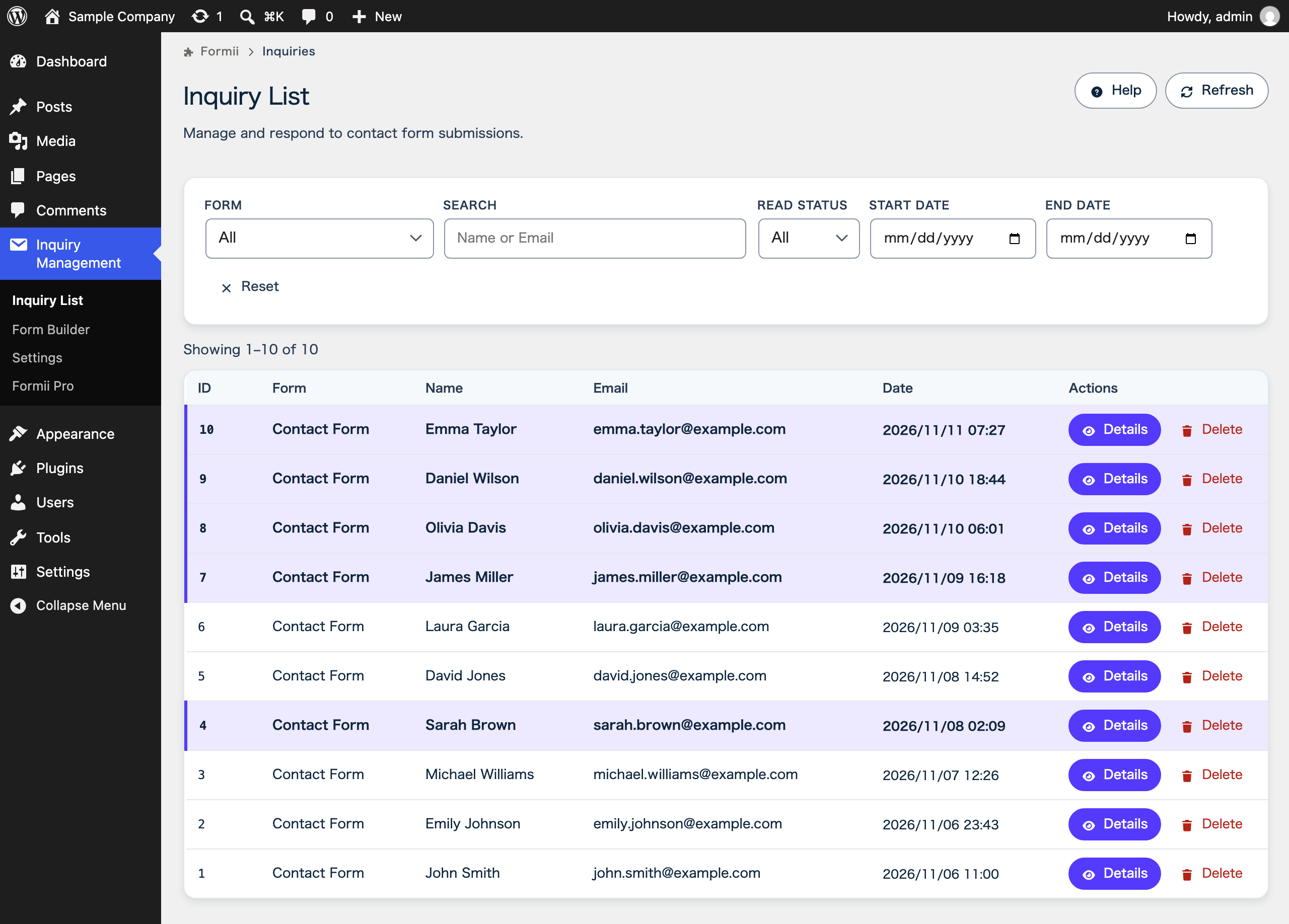
A new inquiry is “Unread”. When you open its “Details”, it automatically becomes “Read”. Filter “Read Status” by “Unread” to see only the inquiries nobody has opened yet.
Users with the Administrator role in WordPress can see the list. Because inquiries are kept on your site rather than in someone’s mailbox, an administrator can still check them after the person in charge changes.
How to view and manage incoming inquiries explains filtering and deleting.
Tracking and exporting
With Formii Pro, you get more ways to manage saved inquiries. These features need a paid plan.
- Recording the work status of each inquiry and leaving internal notes for your team are available on the Small Business plan and above. See Status management and internal notes.
- Exporting inquiries as a CSV file is available on the Business plan. See How to export inquiries as CSV.
FAQ
- Do I need a paid plan to save inquiries?
- No. Saving inquiries, checking them in the Inquiry List, and read or unread tracking are available in the free version. Work statuses and internal notes need the Small Business plan or above, and CSV export needs the Business plan.
- If a notification email never arrived, is the inquiry still there?
- Yes. Formii saves the inquiry before it sends any email, so you can still read it in the Inquiry List.
- How long are saved inquiries kept?
- They stay until you delete them. The free version never deletes inquiries automatically. On the Business plan, you can set a retention period, and inquiries older than that are deleted automatically. Note that deleting Formii from the Plugins screen also deletes all saved inquiries. Deactivating it does not.
Related articles
- Viewing inquiries and marking them as read
- Status management and internal notesSmall Business and above
- CSV exportBusiness
- When emails do not arrive
Formii is free to get started
The confirmation screen and inquiry management are included in the free version.