Preventing spam with the honeypot and rate limiting
Personal and aboveLast updated:
This feature is available on the Formii Pro Personal plan and above.Compare plans
What you'll learn
- See how the honeypot tells automated spam apart from real visitors.
- Understand rate limiting, which caps how often one person can submit.
- Learn how to change the settings and what the defaults are.
What the honeypot and rate limiting are
Both features reduce automated spam submissions. Visitors do not have to pick out pictures or do anything extra.
- The honeypot adds one input field to your form that people cannot see. A person leaves it empty. An automated program (a bot) tries to fill in every field, and fills this one too. Formii treats a submission with text in that field as spam and rejects it.
- Rate limiting caps how many times one IP address can submit. If the same IP address submits again and again in a short time, Formii rejects the later submissions.
Both features are available on the Formii Pro Personal plan and above.
reCAPTCHA v3 is a separate feature. It is available on the Small Business plan and above. See reCAPTCHA v3 to set it up.
Check the settings
- In the WordPress admin, open Inquiry Management → Settings.
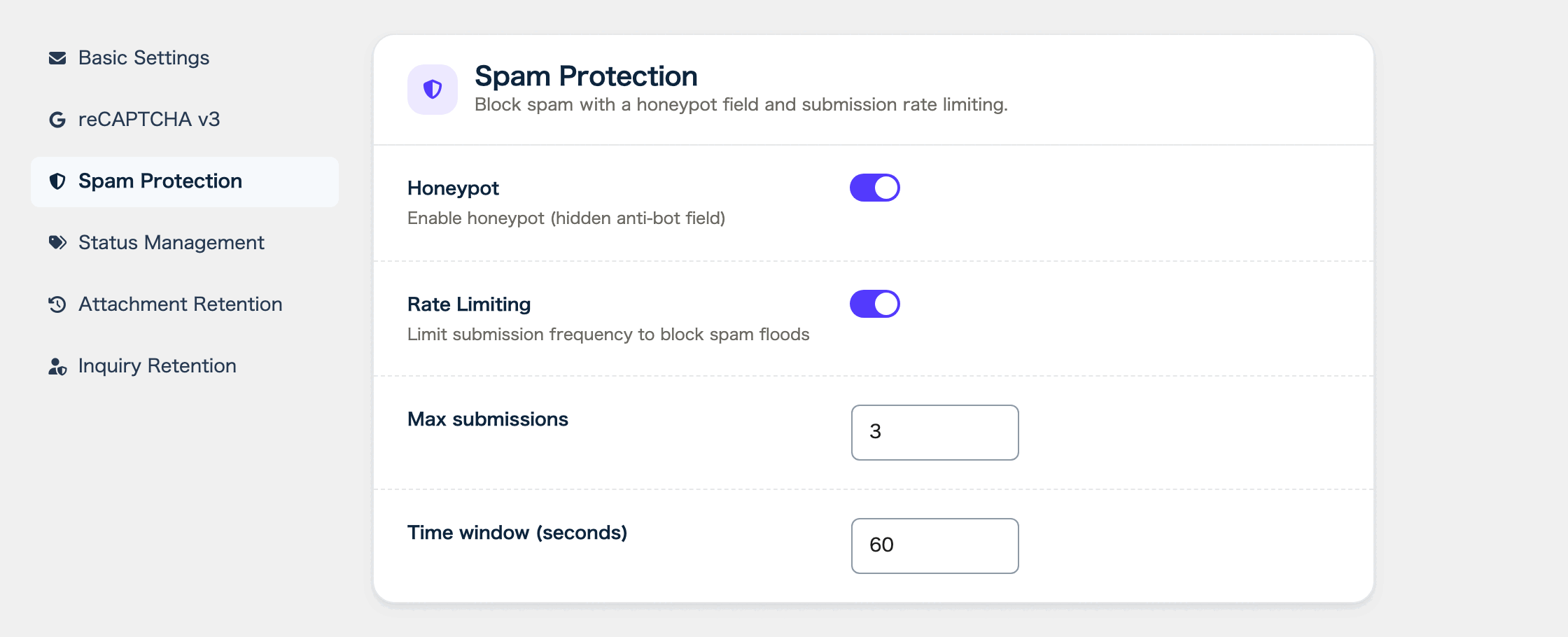
- Open the Spam Protection tab.
- In the “Honeypot” row, turn the switch on or off.
- In the “Rate Limiting” row, turn the switch on or off.
- When “Rate Limiting” is on, the “Max submissions” and “Time window (seconds)” fields appear. Change the numbers if you need to.
- Click “Save changes”. When you see “Settings saved”, you are done.
The honeypot works on every form. You do not need to change any form settings.
Defaults and allowed values
If you have not changed anything, the settings are as follows.
- “Honeypot” is on.
- “Rate Limiting” is on.
- “Max submissions” is 3. You can enter a number from 1 to 100.
- “Time window (seconds)” is 60. You can enter a number from 10 to 3600.
With the defaults, one IP address can submit up to 3 times within 60 seconds. From the 4th submission, Formii rejects it until time has passed.
Some networks, such as an office or a school, share one IP address among many people. If many of them submit one after another, they can hit the limit. In that case, raise “Max submissions”.
What happens when a submission is blocked
For every submission, Formii checks the honeypot, then rate limiting, then reCAPTCHA. If any check fails, Formii does not accept the submission and it does not reach the inquiry list. The form shows one of these errors.
- When the honeypot catches a submission, the form shows “Submission failed. Please try again later.”
- When rate limiting catches it, the form shows a message with the seconds to wait, such as “Too many submissions. Please try again after 60 seconds.”
If real visitors see the rate limiting error, raise “Max submissions” or shorten “Time window (seconds)”.
FAQ
- Can visitors see the honeypot field?
- No. It is not shown on screen, and keyboard navigation skips it.
- Is the honeypot enough to stop spam?
- The honeypot catches spam that fills in every field automatically. If you receive other kinds of spam as well, use rate limiting and reCAPTCHA v3 together with it.
- Can I use the honeypot in the free version?
- No. The honeypot and rate limiting are Formii Pro features, available on the Personal plan and above.
Related articles
This feature is available on the Formii Pro Personal plan and above.
You can start with the free version of Formii. Compare features and prices for each plan on the pricing page.